At Coolblue
Since August 2022 I've been Lead Product Manager in the Gaming, Printers & Office team, covering the Netherlands, Belgium and Germany. I'm responsible for the commercial results and the online customer journey of those categories.
I lead nine people: three commercial product managers, three product journey managers and three product editors. I turn a vision into quarterly roadmaps, prioritise on impact and effort, and bring commercial, marketing, purchasing and development together.
The LEGO category. I set up the LEGO category at Coolblue. I was responsible for launching its customer journey, and I still own its commercial results today. My team built the storefronts, filters and content, and together with the category team's manager I worked on the store plan. Purchasing made the agreements with LEGO.
PlayStation 5, 2020. Back then as Product Manager, Gaming. At the PlayStation 5 launch there was little stock and a lot of demand. I worked with development, the app team, marketing, customer service and logistics. Afterwards I set up a fixed process for new deliveries. Others built the technology; I took care of the coordination and the process.
AI at work. At Coolblue I'm an AI ambassador and power user of Glean, and I help colleagues use and adopt it.
Own apps
With every app I start with two questions: is this worth solving, and what does a first version really need to do? I collect complaints about existing apps, write down what goes in and what doesn't, and test on real devices myself. The price, the App Store text and the support emails are mine too.
-

GRID_BREAKER
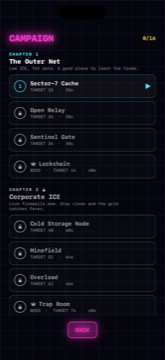
A reflex game you play with one thumb. Decode the grid before it disappears, chain your hits, chase a high score.
- Cut
- A tutorial up front. Each of the four chapters in the campaign adds one mechanic, so you learn it by playing. I also left out ads, in-app purchases and tracking. The leaderboards run through Apple's Game Center.
- Shipped
- Live since June 2026. In version 1.3 the campaign was rebuilt into four chapters, each with a boss.
- Next
- In the US, the game was shown 2,986 times in the App Store this year, and its product page was opened 41 times after that: 1.4% (App Analytics, 1 January to 4 October 2026). So I'm working on the App Store page first. New levels come after that. Since version 1.3.3 (5 October), gameplay is on the first screenshot, and there is a dedicated listing for the UK and for the Netherlands. Whether more people tap through, I'll see in a few weeks.
5.0 ★ 7 ratings85 downloads
-

BabyBeam
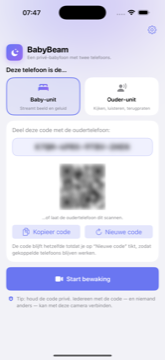
Turns two iPhones into a video baby monitor. Picture and sound go encrypted from one phone to the other, with no server of mine in between, and the app records nothing.
- Cut
- The account and the recordings. BabyBeam pairs two of your own phones with a code, and the app stores no video.
- Shipped
- Live since 13 July 2026. The full story is below: the problem, the priorities, the releases, what went wrong and what I measure.
5.0 ★ 2 ratings1,006 downloads
-
WristVault
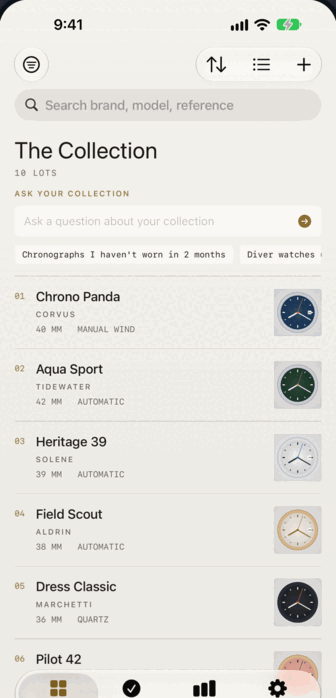
Keeps track of a watch collection, logs what you wear, and exports a PDF for your insurer. No account: it syncs through your own iCloud and nowhere else.
- Problem
- Many collectors keep track of their collection in a spreadsheet. Watch forums have been talking about it for years. In reviews of existing apps, people mostly complained about iCloud sync that falters, and no app made a PDF for your insurer. I looked into that before I started (July 2026).
- Cut
- Market values, a social feed, accounts, a subscription, widgets and multiple collections. I deliberately left those out of version 1. You buy Pro once. The free version tracks three watches, so Pro has to add something real.
- Shipped
- A collector with 3,000 watches emailed to ask whether the app could handle that. I turned that into an acceptance criterion for the import: a 3,000-row file with a bad row in it has to process the rest anyway. Importing and custom categories were the two things users kept asking for. They came in version 1.1.
- Next
- In the US, the app was shown 4,570 times in the App Store this year, and its product page was opened 51 times after that: 1.1% (App Analytics, 1 January to 4 October 2026). Version 1.3 (5 October) has seven new screenshots, a preview video and a dedicated listing for the UK and Mexico. On iPad, the collection and the details now sit side by side. Whether more people tap through, I'll see in a few weeks.
No ratings yet156 downloads
-

BattleFold
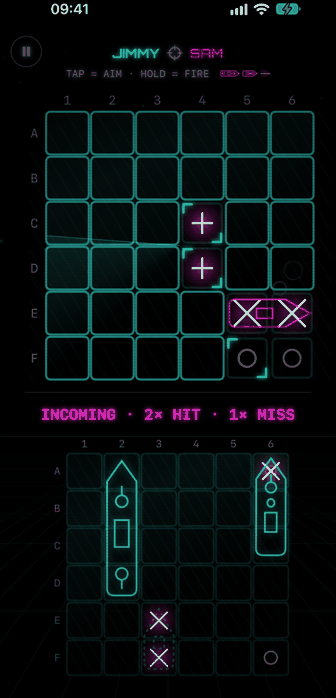
A sea battle for two people at one table, on one iPhone Duo. Your tracking grid stands upright, your own fleet lies flat on the table. When your turn is over, you fold the phone shut and turn it to the other player. On a regular iPhone, a button takes the place of the fold.
- Problem
- Games with hidden information on one phone solve peeking with an honour code: don't look. On a foldable, the fold itself can be the screen between the players. Folded shut, the outer screen only shows a neutral periscope view, never a board. I built it for the launch of the iPhone Duo on 23 October 2026.
- Cut
- Online play, a computer opponent, accounts, ads, in-app purchases and an iPad version: none of them are in version 1. My original idea went too: both screens at once, each facing one player. With the iOS 27.1 APIs that turned out to be impossible. An app never shows on the inner and the outer screen at the same time, and the 'accessory' routes are read-only or need a camera session. So I rebuilt the design around it: folding the phone shut is the turn change.
- Shipped
- Live since 31 October 2026, €4.99 once, in 174 countries. A 'render gate' only draws the board when the phone is really open: at the right hinge angle, with hysteresis so it doesn't flip back and forth around that angle. You hold to fire, so a phone wobbling on the table never fires by accident. Also in version 1: hits with their own sound and haptics, a guided practice game, 15 Game Center achievements, English and Dutch. I developed and tested it in the Duo simulator, before the device was out. Review took a long time because the country selection was missing: if you set up an app entirely through the API, it never gets created.
- Next
- Testing on a real Duo, fine-tuning the sound effects and seeing how the product page converts. It's too early for numbers. At launch a direct competitor came out: Twofold, with seven classic games for the Duo. BattleFold bets on the experience instead: the hits, the sound, the periscope.
No ratings yet
Also Stillwater ↗: a pond in a browser tab. An experiment with timing and weight, without a store around it.
Ratings come from the App Store, downloads (since launch) from App Store Connect. Both update automatically every day. As of 3 November 2026.
One case
BabyBeam: a baby monitor without an account, from first version to 1.5.4.
- Problem
- Baby monitor apps are expensive or ask for a subscription, and often an account too. I wanted one every parent could use without worrying about privacy or cost.
- My main decision
- No account and no server of my own. Video and sound go encrypted between two phones, and the app records nothing.
- Shipped
- Live since 13 July 2026, now version 1.5.4: live video and sound, cry alerts, talk back and QR pairing. After launch, mostly reliability and a better feedback button.
- What I see and don't know yet
- Few people in the US tap through to the page in the App Store. My guess is that the black screenshots play a part. Version 1.5.4 has a new set; whether it helps, I'll know in a few weeks. How many people actually use the app, I don't know.
- What I learned
- Reliability first, extra features later. And whatever is claimed about the app, including on the App Store page, I check as strictly as the app itself.
The problem
There are standalone baby monitors, which end up in a drawer after a few years, and there are apps. Those apps are expensive if you buy them outright, or you're tied to a subscription. Often you also have to create an account. I wanted a baby monitor without an account and without stored video, one every parent could use without worrying about privacy or cost.
There was already a first working version from June: two phones that pair with a code and pass on video and sound. Before I wrote a backlog for it, I collected the complaints about well-known monitors and apps: Nanit, Owlet, Annie, Bibino, Cloud Baby Monitor and Luna (early July 2026). Among other things, people complained that the connection drops with no alarm, that the sound stops when the screen locks, that you can't see the baby phone's battery running down, and that basic features sit behind a subscription.
The call
I don't run a server of my own. Video and audio go over WebRTC between the two phones, encrypted with DTLS-SRTP, and the app records nothing. For pairing, the app uses Apple's iCloud: both phones leave a small message there, encrypted with a key derived from the pairing code. That code only lives on the two phones. Once the connection is up, each phone deletes its own message again.
It usually works when you're not home too. The phones look for each other over the internet and, to do that, ask a Google STUN server for their internet address. No video or sound passes through it.
How I prioritised
A baby monitor that stops without warning is worse than one with few features. That was my starting point. So everything that builds trust came first: a watchdog that notices when the picture freezes, the baby phone's battery on the parent screen, sound that keeps playing when the screen locks, and cry detection on the device itself. Only after that came things like QR pairing and lullabies from the other room. Building went fast: AI built phases 0 to 3 on 2 and 3 July. I ticked off a task once its tests passed, and then tested everything on two real iPhones.
I deliberately postponed several viewers at once, so both parents can watch. Without a server, the baby phone has to send the video separately to each viewer, and that phone is on all night. I decided to pick this up only after launch, with at most two viewers and the second one audio-only by default. The decision itself is below, under working notes.
What shipped
- July 2026First version in the App Store, live on 13 July. With live video and sound, cry alerts, talk back, QR pairing and status on the lock screen. I had first planned it as a paid app, but it went live for free.
- AugustA tip jar (1.3). A tip doesn't buy anything extra; putting baby monitor features behind money isn't something I can defend. After that came German, French and Spanish, and a feedback button in the app (1.5.0).
- SeptemberMostly reliability (1.5.1 to 1.5.3). Pairing can no longer hang without you noticing, and cry and connection alerts get through the iPhone's Sleep Focus. The app only asks for a tip after six successful sessions, never during use. And you can no longer send an empty feedback email.
- OctoberVersion 1.5.4, live on 5 October: new screenshots and a preview video, and a dedicated listing for the UK and Mexico. The simulator has no camera, so the monitor in them plays a stock video of a baby.
What went wrong
My first submission was rejected on 4 July. Apple's reviewer heard no background audio, even though the app asked for permission to play it. That was because no session starts without two paired devices, so there was nothing to hear. I could have dropped that permission, but continuous sound with the screen locked is exactly what a baby monitor is for. I sent a screen recording made on two real devices, with test instructions. On 12 July I resubmitted, and on 13 July the app was approved and live.
In September I got feedback emails with no message, just the template. A German-speaking user had tapped the "translation" category, which sits at the top with German settings, and sent the email straight away. That same day I had a required text field added. It went out in 1.5.3.
The first screenshots turned out to be black. The simulator they were made with has no camera, so the most important images of a video baby monitor showed no video. I only found out when I looked at the numbers per country.
What I measure
The app sends me nothing. What I measure comes from App Store Connect. From 7 July to 4 October 2026, BabyBeam was shown 5,579 times in the App Store in the US, and its product page was opened 140 times after that: 2.5%. In Germany it was 68 out of 558, 12.2%. My guess is that the black screenshots play a part, but a difference between countries doesn't prove that. The new set has been live since version 1.5.4; whether it helps remains to be seen. These numbers say nothing about how many people actually use the app. I also read every feedback email. The app only asks for a rating after a session of at least ten minutes without connection trouble.
What it cost
- An extra step during setup Both phones need to be signed in to iCloud. Not with the same Apple Account, but signed in. An app with its own cloud doesn't have to ask for that.
- Connecting is partly up to the user Two phones looking for each other directly usually find each other, but sometimes a provider's network blocks that. Then you have to add a TURN relay yourself, in the settings. Video and sound then go through that relay, still encrypted. In effect, I've handed that problem to the user.
- The marketing had to change too The pairing code keeps the connection secure, so it can't be visible anywhere. Not even on my own App Store screenshots. I had to redo those with the code unreadable.
Next
Several viewers is the biggest piece still open, and also the heaviest change since the start. After launch, reliability, feedback and discoverability came first.
Working notes
Four excerpts from my project notes for BabyBeam. I translated them from Dutch and shortened them, but didn't rewrite them. I write these notes together with AI; the decisions in them are mine.
-
Backlog · from 2 July 2026
Project plan v2 "Trust first": phases and tasks
Then. Phases 0 to 2 and the Live Activity have been built and tested on two real iPhones. Several viewers and the Watch app are still open. Read the excerptProduct principle 3. Reliability > features. A baby monitor that fails silently is worse than a bare-bones one.
Phase 0 — Foundation
- [x] 6.0 DataChannel + protocol.
Phase 1 — Trust (highest priority)
- [x] 6.1 Baby unit telemetry on the parent screen.
- [x] 6.2 Connection watchdog.
- [x] 6.3 Prove and finish background audio (parent).
- [x] 6.4 ⚠️SPIKE Real cry detection.
Phase 2 — Comfort
- [x] 6.5 QR pairing.
- [x] 6.6 Night vision (internal name — it's low-light boost, NOT infrared; so never claim 'night vision' in marketing).
- [x] 6.7 White noise & lullabies from the other room.
- [x] 6.8 Pinch-to-zoom (parent).
Phase 3 — Reach
- [x] 6.9 Live Activity + Dynamic Island (parent).
- [x] 6.10 Multi-viewer — design (ADR).
- [ ] 6.11 Multi-viewer — implementation. ⏸️ POSTPONED until after the release
- [ ] 6.12 Apple Watch companion. ⏸️ Behind 6.11, so also after the release.
-
Story · 20 September 2026
Require a message before the feedback email
Then. Built the same day and shipped in version 1.5.3. Read the excerptProblem. The feedback flow opens the mail composer straight away, prefilled with just an invitation line and the diagnostics block (version, app language, device, iOS version, role). Nothing forces the user to type their own text above it. Result: emails that look empty — just the template, no message of their own.
Desired solution.
- User picks a category as now.
- Instead of starting the composer straight away, the app shows a small text entry screen: "What would you like to report?", explaining that the diagnostics block is added automatically.
- Send/next button is disabled while the field is empty (whitespace-only counts as empty).
- Only once filled in does the mail composer open, with the user's own message at the top followed by the existing diagnostics block.
- "Connection trouble" (no mail flow) stays unchanged.
Constraints. No new backend. New strings in all 5 languages. Existing unit tests must not break; add tests for the new validation (empty/whitespace-only blocks sending).
-
Decision · 3 July 2026
Several viewers: only after release
Then. Two technical options worked out, with a preference for the simpler one. Not built yet. Read the excerptContext. WebRTC is peer-to-peer and one-to-one. Without an SFU [a server that forwards the video], N viewers means the baby unit maintains N separate peer connections and encodes and uploads the video N times.
Decision criteria. Principles intact: serverless, no account, nothing stored, reliability first. Battery/heat of the baby unit (which is on all night) manageable.
Decision. Priority: after the release. First device testing + release with the current features; multi-viewer after that. Max viewers: 2. Extra viewers: 2nd+ audio-only by default, video on request.
-
Rejection · 4 July 2026
App Review, guideline 2.5.4
Then. A screen recording on two real devices, a reply to App Review with test instructions, and the same instructions fixed in the review notes for every later submission. Resubmitted on 12 July, approved and live on 13 July. Read the excerptRejected under Guideline 2.5.4: the reviewer heard no audio while
UIBackgroundModes: audiois declared. Cause: without two paired devices the reviewer can't start a session, so can't hear any audio either. Do NOT remove the audio mode — continuous background audio (the parent keeps hearing the nursery with the screen locked) is the core feature and exactly the permitted use.
On AI
AI writes all the code in these apps. I don't program myself. My job is deciding which problem I solve, what goes in and when something is done. I test on real devices and I decide what goes live. So I don't call myself a developer.
What the app does is usually right. It goes wrong in the text around it.
Three examples from this site. All three were online for weeks before I noticed. Crossed out is what the page claimed, underneath is what was actually true.
- GRID_BREAKER · privacy policy “No network connections, servers, or cloud services.” The game has Game Center leaderboards. The sentence sounded convincing but wasn't true, right under a live App Store listing.
- WristVault · landing page “Your collection never leaves your device.” The privacy page below it actually described iCloud sync. Both sentences were meant to reassure people, but only the second was true.
-
WristVault · call to action
“Coming soon to the App Store”
It was an
href="#". The button did nothing, and it went live like that.
These aren't bugs, but sentences that sounded right and weren't. Only someone who knows the product can check that. I found them weeks later, during a review. Since then I check text from AI as strictly as the app itself. Nothing goes live until I've held it against the product, the legal pages included.
I work with a fixed project structure and notes I reuse for each app. They mostly record what went wrong before, so I don't do it again. A new app doesn't start from zero because of that.
Contact
Want to talk about product work, leading a commercial team or shipping your own apps? Feel free to email me.